
Process Mapping: The Top 3 AI Skill in 2026
Do you know the feeling when something keeps going wrong in your company but you cannot pinpoint exactly where the problem lies? When tasks get stuck at the last minute, clients are frustrated, and you yourself are losing the overview?
The solution often lies not in working harder, but in a simple yet powerful method: process mapping. This visual technique makes invisible workflows visible, and shows you at a glance where your business is getting stuck and how to make it less stressful and more efficient.
This is exactly the process from this article that we also use with clients in the kick-off call.
The six questions that systematize your business
Before we get into process mapping, you should understand what systematizing is really about. For every important business area, you should be able to answer six central questions:
Why are we doing this at all?
What specifically needs to happen?
Who is responsible for it?
When does it happen?
How does the process work?
Where do we document everything?
Most entrepreneurs start with the tactical questions: what, who, and when. These are the operational basics that ensure tasks actually get done. After that come the "how" (often through templates and SOPs) and the "where" (the right software). But the most difficult and simultaneously most important question is the why.
And this is exactly where process mapping unfolds its full power.
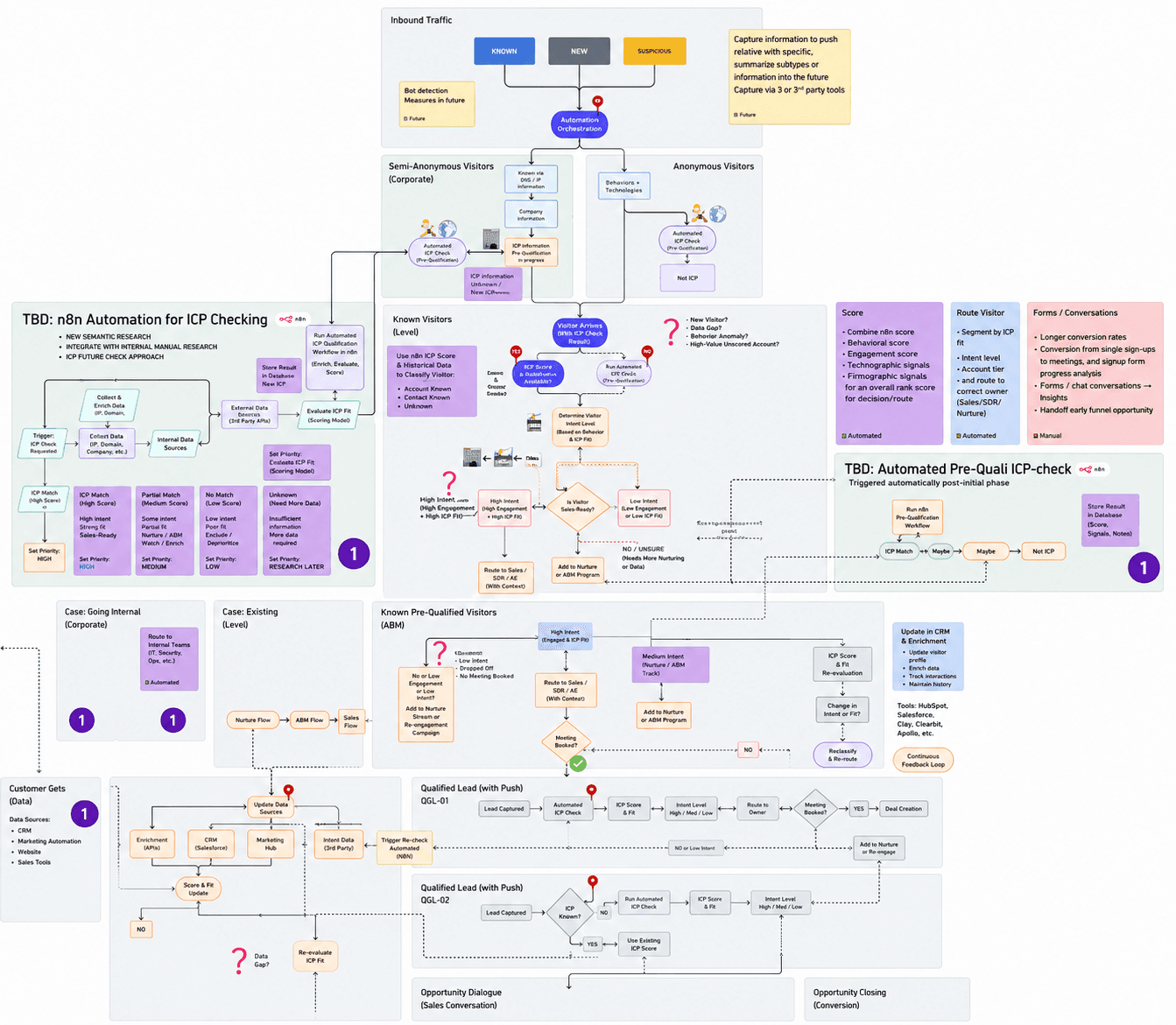
Clear end-to-end overview of the entire inbound and outbound flow, from anonymous website traffic through pre-qualification, ICP check, and MQL/SQL stages through to opportunity dialogue and closing, including n8n and Zapier automations and CRM integrations.
What is process mapping exactly?
Process mapping is a visual form of storytelling that makes hidden workflows in your company visible. Instead of endless text or confusing descriptions, you draw the reality of your business, step by step.
This lets you see not only what happens, but also why certain workflows matter for the bigger picture. For several years this method has been helping companies across all industries, from landscapers and lawyers to agencies, to understand and optimize their processes.
This does not have to be a process map for your entire business. It can start by focusing on one specific area (department) of the company.
How to start your first process mapping
Step 1: Find your pain point
Grab a piece of paper, a whiteboard (digital with Miro or analog), and focus on an area of your business that is important but not running smoothly. Typical examples:
Client onboarding
Sales process
Customer support
Website updates
Handling client change requests
These "pain points" are particularly valuable because improving them has a major impact on your entire business.
Step 2: Define the scope
Now you decide: where does the story begin and where does it end? Keep the frame manageable so you do not sink into detail chaos. Examples:
Sales process: start at a lead, end at a closed sale
Fulfillment: start at a new client, end at their offboarding
A clear start and end point helps you stay focused.
Step 3: The four magic symbols
Forget complicated diagrams. You only need four basic symbols:
Rectangle: a process step or action
Diamond: a decision with alternative paths (yes/no)
Folder symbol: a complex workflow that you abstract ("predefined process")
Arrows: they connect everything and show the flow
That is all you need.
Step 4: Start on the left and ask "what comes next?"
Start on the left side of your page and answer: what happens first? Write this first action in a rectangle. Then keep asking the same question: "what happens next?"
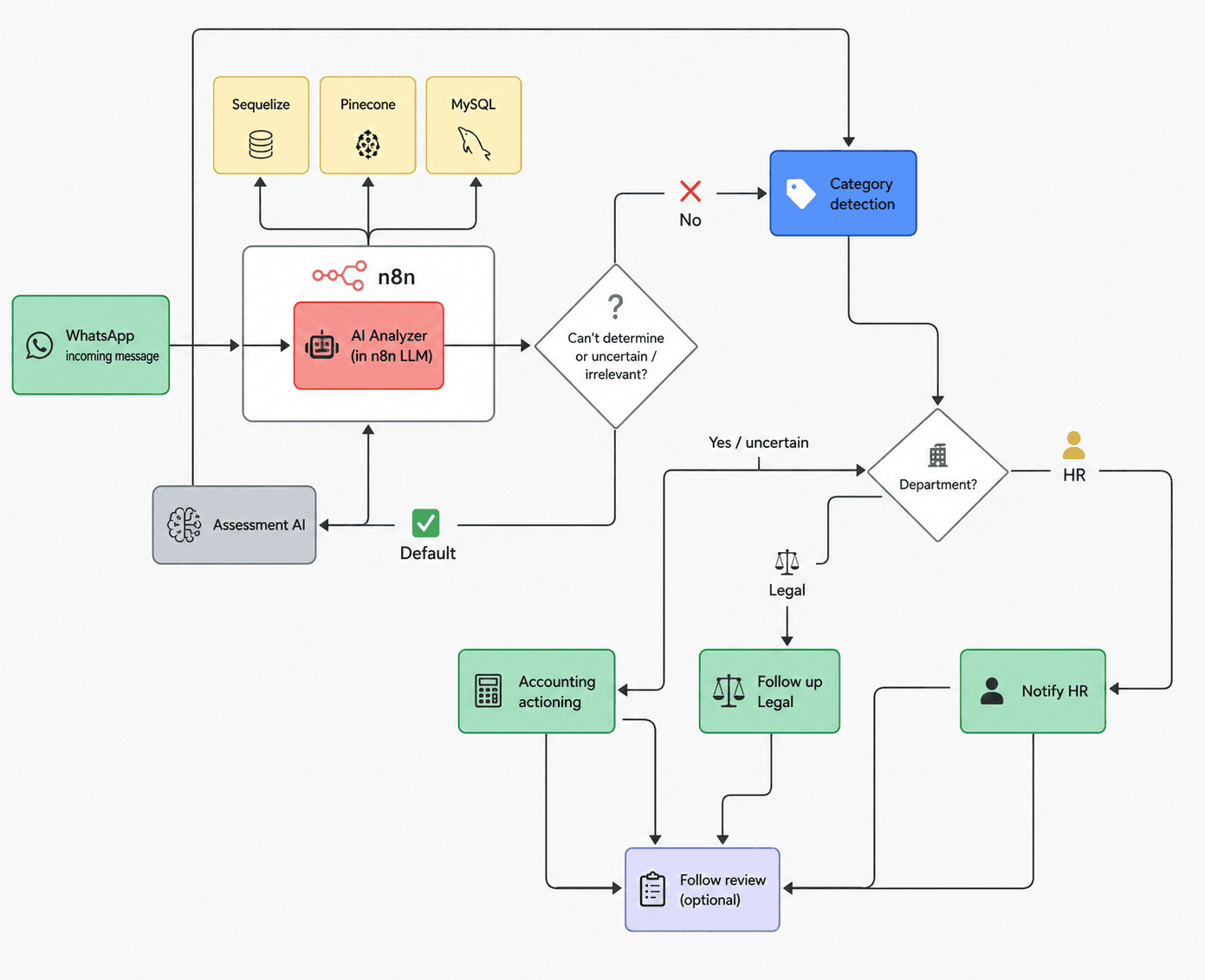
Our WhatsApp NEXUS customer support system: process overview for automated processing of incoming WhatsApp messages at a tax firm, including AI analysis in n8n, decision logic for quick response capability, category and department-based routing (e.g. accounting, legal, HR), automatic Jira ticket creation, and a central ticket overview with database integration.
An example from service fulfillment:
Checkout completed
Confirmation page appears for the client
Scheduling page is displayed
(Parallel) Sales confirmation runs internally
(Parallel) Project template is automatically applied
Important: map every step individually, whether a person or an automation carries it out. But avoid capturing everything down to the smallest detail. Focus on the central and painful workflows so you do not suffocate in the pursuit of perfection.
Step 5: Parallel processes and decisions
Sometimes things happen simultaneously, for example when a client starts a training while your team is preparing the first call. Display these steps as synchronized in time or use delay arrows to make the logic clear.
And then there are decisions (diamond symbol): "Is there enough information to plan ahead?" If yes, the next step follows. If no, a different route follows, such as requesting missing data from the client. This is how paths branch off and later converge again.
Golden rule: document the current state
During the mapping process you will inevitably come up with ideas for improvement. Resist the temptation to build them in immediately. Stick strictly to the current actual state and note optimizations separately. Otherwise you mix reality with wishful thinking, and your process map becomes worthless.
Finding the right level of detail
A good benchmark: one process step (rectangle) corresponds roughly to a single task that one person completes in one sitting. Neither too broad ("handle project") nor too granular ("move mouse, click").
Tasks that span many hours or dozens of small actions should be split up.
Swimlanes: the secret weapon for deeper insights
Sometimes pure mapping does not immediately bring problems to light. In that case, additional "layers" called swimlanes help make further dimensions visible.
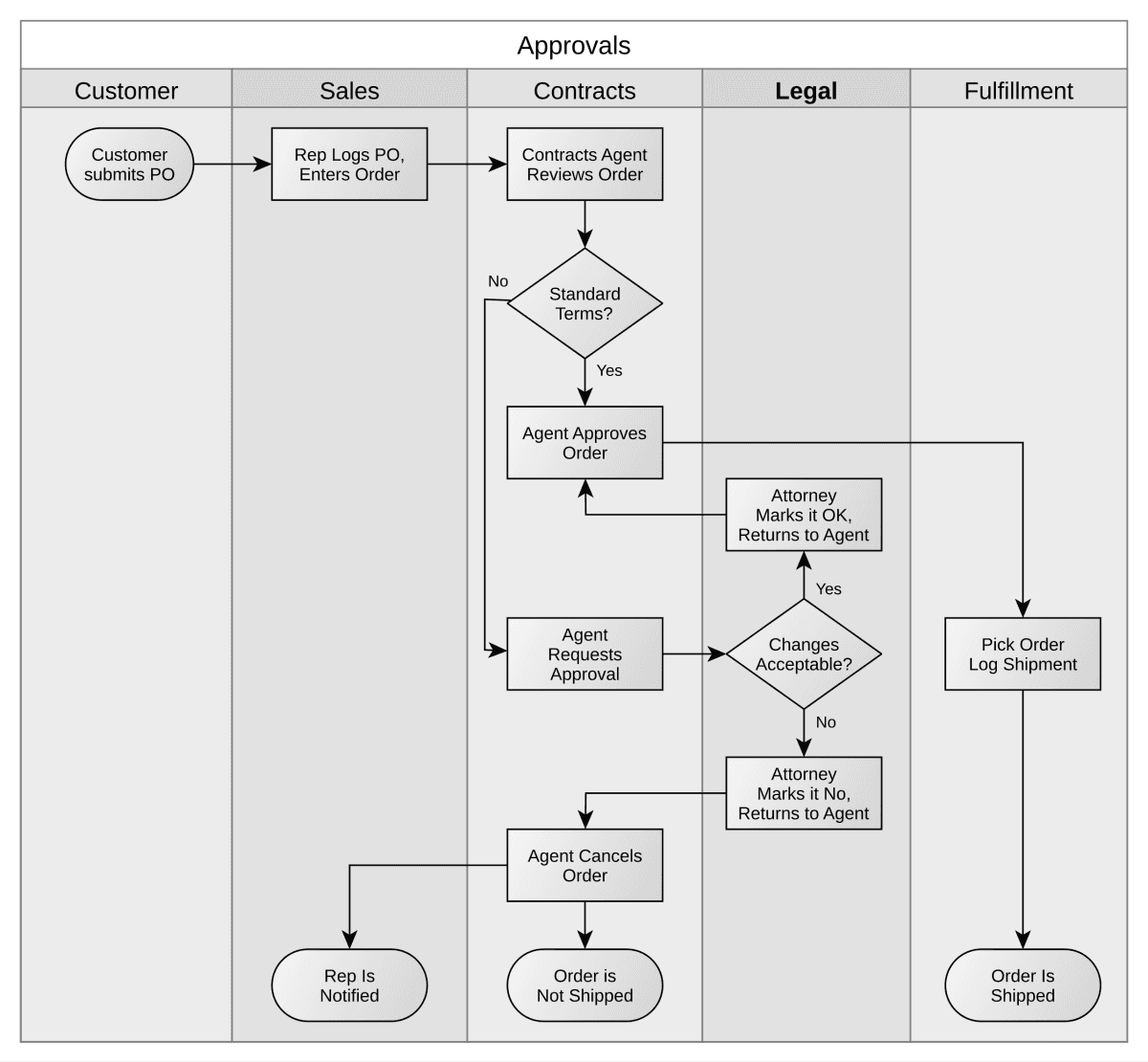
Swimlane flowchart of the approval process. The swimlanes are arranged vertically and show the involved areas of Customer, Sales, Contracts, Legal, and Fulfillment, along with their respective process steps and decision paths. Source: Wikipedia
1. Responsibilities
Show exactly which employee takes on which task. This lets you identify friction or problematic handovers, for example when multiple people are involved in quick succession, which often causes errors or delays.
2. Software and tools
Map out which software is used at each step. Are you using many different tools? Then you can see at a glance where interface problems or inefficiencies arise.
3. Time requirements
How many minutes does a task take from the team? How long is the client actively involved? This layer makes costs and delays visible.
4. Emotions (the insider tip!)
The emotions layer is incredibly valuable, particularly for service processes. Note how the client feels during different phases:
Joy at the point of purchase
Frustration when scheduling
Relief after the first call
With these emotional insights you can specifically improve client experiences, reduce drop-offs, and avoid ghosting.
The decisive final step: from mapping to action
This is where most people fail. They create beautiful process maps and then nothing happens. Process mapping without implementation is worthless. Concrete actions must follow from your map:
Define who is responsible for each step
Set up appropriate software or optimize existing tools
Create templates and SOPs for recurring workflows
Hire new staff if necessary (ideally an AI employee 😉)
Continuously improve based on your findings
Only then does the mapping become a catalyst for real change. The bridge between processes and actual tasks is essential here. Without it, your map remains a pretty picture without impact.
Your guide to a systematic business
Process mapping is not a complicated science, but a practical method that every entrepreneur should master. With a few symbols, the right question ("what happens next?"), and a little patience, you make invisible workflows visible and gain the clarity you need to make your business less stressful and more efficient.
Your next step: grab a piece of paper today and start with a pain point. Document the current state, discover bottlenecks, and derive concrete improvements. You will be surprised at how much you learn about your own business and how much potential is still waiting to be unlocked. Good luck!
About APEX Consulting
APEX Consulting is an AI automation and growth consulting firm supporting B2B organizations with intelligent workflows, AI agents, CRM automation, and scalable operating systems. The firm focuses on practical, implementation-driven solutions that reduce manual effort and enable sustainable growth.
More information: https://apex-consulting.ai/